Frequently Asked Questions
On this page you will find the most common questions and corresponding answers about the Barcode Scan app for Exact Online.
What can I do with the Barcode Scan App for Exact Online?
With the barcode scan app you can:
- Receive incoming goods
- Order picking / process sales orders
- Create sales orders
- Move products (between different warehouses or storage locations)
- Create multiple purchase orders / ordering round
- Process returns
- View transactions
- Inventory overview
- Replenish materials (bulk to pick stock)
- Verify sales orders
- Count products / stock counts
- Book products in or out without a sales order
- Print labels
- Change settings
- Access your inventory anytime, anywhere via the web interface
- Work orders
- Analyze
- Production / Manufacturing
- Smart Shop Floor App
- Real-time inventory management
- MCP - AI integration
Watch the video below to get a good overview of the possibilities:
Get started quickly with barcode scanning
Watch this video for a quick explanation of the basic functionalities:
What does Barcode Scanning for Exact Online cost?
The barcode scan app can be used free of charge for 1 month. Go to https://www.barcodescan.nl/app/ to get started right away.
After that, you can decide whether this app is a good fit for your process. You can then subscribe for the desired functionality.
On this page you can find more information about the different subscriptions.
How do I use a barcode scanner with the Barcode Scan App?
The barcode scan app can be used on a smartphone, tablet, PC or even industrial barcode scanners. The app also works perfectly without a barcode scanner on a tablet or smartphone.
Various pages in the app have a barcode field as shown below.

Press the button with the barcode icon to scan barcodes using your smartphone or tablet camera. For scanning small quantities, this is a great solution. Do you scan barcodes more frequently? Then use a Bluetooth or industrial barcode scanner to work even faster.
The barcode field is selected by default when you open a page, so you can scan a barcode immediately. Have you clicked somewhere else on the page and want to scan a barcode again? Make sure you select the barcode field first before scanning a new item.
A (Bluetooth) barcode scanner must be configured to pass the scanned barcode as keyboard input (HID). It is important that the barcode is terminated with an Enter key (suffix). This ensures the barcode scan is properly recognized and processed by the app.
On this page we explain the different options for using a barcode scanner.
How can I change quantities?
There are several different ways to change the number of products:
Scan barcode
Scan the barcode of the product to add 1 to the count.
Plus or minus button
Use the plus and minus buttons to change the number of products:

Or enter the quantity directly by pressing the number.
Double click
Double-click on the product to copy the full quantity. When you double-click on the product, the quantity to be delivered is copied. When the quantity and the quantity to be delivered are equal, the product turns green.

Swipe
Swipe the order line to the right to copy the full quantity. When you swipe the order line to the right, the quantity to be delivered is copied. When the quantity and the quantity to be delivered are equal, the product turns green.
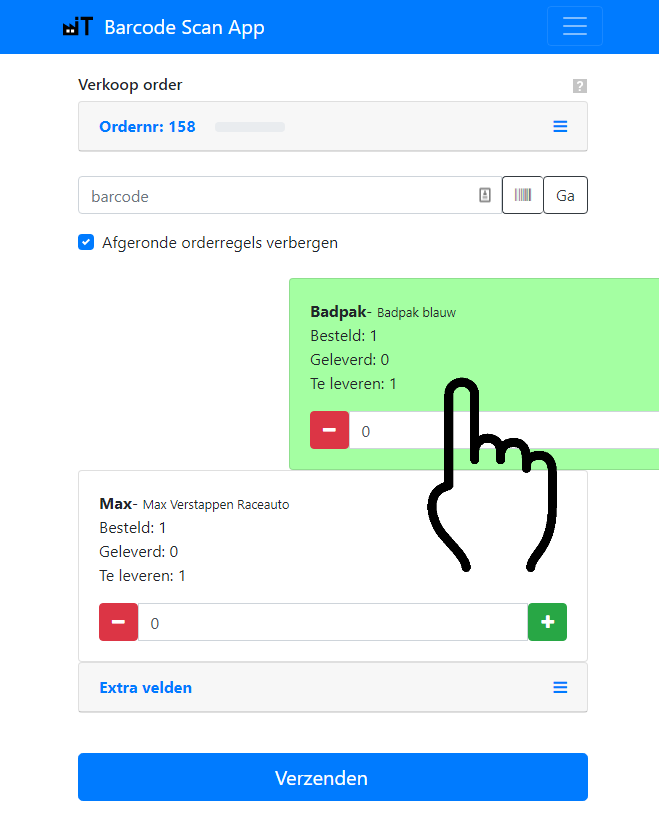
Is a product out of stock and you want to hide this order line? Swipe the order line to the left until it turns red. The order line will then disappear from view if you have enabled the “Hide completed order lines” option.
What data is retrieved from Exact Online?
We retrieve inventory-related data (purchase and sales orders, stock levels, batch and serial numbers) and related master data.
When is the data refreshed?
When you log in for the first time, all required data is retrieved from Exact Online. This may take a while before everything is loaded. After that, each time you log in, the system checks for changes. These are then loaded. This usually takes about a minute.
Do you want to refresh the data yourself? You can do so by going to the settings and pressing one of the buttons below:
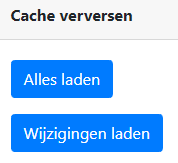
What happens if I don’t extend the 1-month trial period?
You can use the Barcode Scan App for Exact Online free of charge for 1 month. If you decide not to continue using the app, you can cancel at no cost.
How can I convert my trial subscription to a monthly or annual subscription?
If you are satisfied with the Barcode Scan App, you can convert your trial period directly into a monthly or annual subscription. To do this, click on Subscription in the app:

View the different subscriptions that are available here.
How does Industrial IT handle customer data?
Industrial IT handles your data with great care and is committed to converting your data into targeted management information for your business. If you no longer wish to use our services, we will delete your data at your request.
Where is my data physically stored?
We store data in highly secured data centers in the Netherlands.
How is the data secured?
- We store data in highly secured data centers in Europe.
- We do not store Exact Online login names and passwords.
- Your data is stored in a database on secured servers. This database is protected by IP address and with an encrypted password.
- Access to the database is locked with an encrypted password.
- Industrial IT and the Barcode Scan App communicate exclusively over HTTPS, the most secure internet protocol.
Other questions
- How can I set a storage location as preferred?
- How can I load new data?
- How can I report security issues? Responsible disclosure
- What do I need to do before I can start barcode scanning?
- Which subscriptions are available?
- How can I install the app?
- I get the message “The Exact Online API daily limit has been reached” - what now?
- The app doesn’t recognize the barcode, what now?
- Is it possible to print a packing slip from the app?
- Where can I find my invoice?
- How does the GS1 or UDI barcode work?
- How does the HIBC UDI barcode work?
- Can I also register batch and serial numbers?
- Can I use assembled items?
- How can I work with FIFO (First In First Out) or FEFO (First Expired First Out)?
- Can I display only the deliverable sales orders?
- Can I use my iPhone with the app?
- How can I assign sales orders to a specific user?
- Can I temporarily save sales orders without delivering them immediately?
- How can I cancel my subscription?
- Which barcodes does the Barcode Scan App support?
- Can I use multiple packaging units?
- Which physical barcode scanners are supported?
- How can I add photos and documents to Exact Online?
- How should I configure an industrial barcode scanner?
- How can I print from an Android device?
- How can I print via NiceLabel?
- What is a user for the Barcode Scan App?
- Can I use multiple barcodes per item?
- Which permissions need to be configured in Exact Online?
- How can I revoke permissions?
- How can I put away received goods to storage locations?
- Can I process multiple sales orders at once?
- How do saved drafts work?
- How can I detect duplicate barcodes?
- How can I monitor API usage?
- How can I track the progress of orders and production?