What is MCP?
MCP (Model Context Protocol) is an open standard that allows AI assistants like ChatGPT, Claude, Google Gemini, Microsoft Copilot and Perplexity to securely connect to external data sources. The Barcode Scan App provides an MCP server that allows your AI assistant to directly query your Exact Online warehouse data.
Instead of manually looking up information in Exact Online, you simply ask your AI assistant a question. For example: "How much stock do we have of item X?" or "Which purchase orders are still open for supplier Y?"
What can I do with MCP?
The MCP server provides 52 tools that allow your AI assistant to search and query your warehouse data. The tools are grouped into the following categories:
Search
- Search items – search by item code, barcode or description
- Search accounts – search suppliers and customers
- Create account – create a new customer or supplier in Exact Online
- Create sales order – create a new sales order in Exact Online
- Create purchase order – create a new purchase order in Exact Online
- Create shop order – create a new shop order (production order) in Exact Online
- Add sales order line – add an order line to an existing sales order
- Add purchase order line – add an order line to an existing purchase order
- Create goods delivery – create a goods delivery for a sales order
- Create goods receipt – create a goods receipt for a purchase order
- Create warehouse transfer – create an inventory transfer between warehouses
- Process warehouse transfer – process an existing warehouse transfer
- Search purchase orders – filter by status, date, supplier and warehouse
- Search sales orders – filter by status, date, customer and warehouse
- Search shop floor orders – search production and assembly orders
- Search goods receipts – search incoming goods receipt entries
- Search goods deliveries – search outgoing goods delivery entries
- Search warehouse transfers – search transfers between warehouses
- Search sales returns – search and filter planned sales returns
- Create sales return – create a sales return for a sales order
- Process sales return – process an existing sales return
- Create contact – create a contact person for an existing account
- Search assembly orders – search and filter assembly orders
- Get supplier items – find which suppliers deliver an item
- List storage locations – list all storage locations of a warehouse
View details
- Purchase order details – complete information for a specific purchase order
- Sales order details – complete information for a specific sales order
- Shop floor order details – complete information for a specific shop floor order
- Goods receipt details – complete information for a goods receipt
- Goods delivery details – complete information for a goods delivery
- Warehouse transfer details – complete information for a transfer
- Sales return details – complete information for a sales return
- Get bill of material – view the bill of materials for an item
- Get shop order routing steps – view the routing steps of a production order
Production & assembly
- Create shop order receipt – report a quantity as finished for a production order
- Create material issue – issue material to a production order
- Create material reversal – reverse a previously issued material
- Receive by-product – receive a by-product from a production order
- Finish assembly order – finish an assembly order
- Create time transaction – register time on a routing step of a production order
Stock
- Stock information – stock levels per warehouse, including batch and serial numbers
- Location stock – stock per storage location within a warehouse
Traceability
- Batch history – track the movements of a batch number
- Serial number history – track the movements of a serial number
Other
- View warehouses – overview of all available warehouses
- View current warehouse – see which warehouse is currently active
- Switch warehouse – switch to a different warehouse
- View administrations – overview of all available administrations
- View current administration – see which administration is currently active
- Switch administration – switch to a different administration
- List shipping methods – overview of all available shipping methods
- Send feedback – submit feedback or suggestions via the AI assistant
Example questions
Once the MCP server is connected to your AI assistant, you can ask questions like:
- "How much stock do we have of item 12345?"
- "Which purchase orders are open for supplier Acme B.V.?"
- "Give me the details of sales order SO-2026-001234"
- "Where is batch number LOT-2025-A stored?"
- "Which sales orders were delivered today?"
- "What is the stock in warehouse Main Warehouse per storage location?"
- "How many shop floor orders are in production?"
- "Give me an overview of all warehouse transfers from this week"
- "Create a purchase order at supplier Acme for 100 units of item X"
The AI assistant automatically calls the correct MCP tools to answer your question.
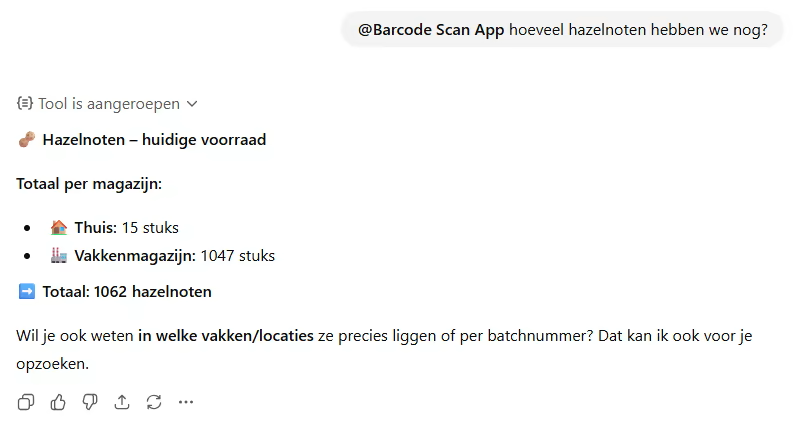
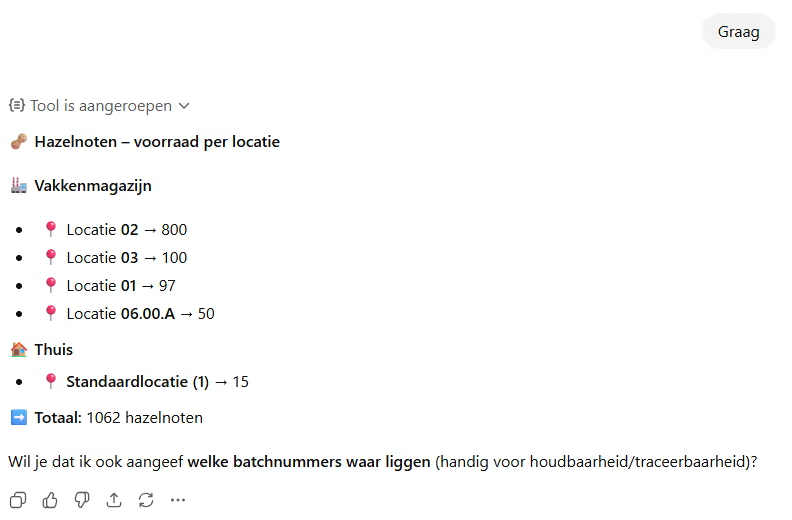
Example: ChatGPT with MCP
Below you can see an example of ChatGPT querying warehouse data from Exact Online via MCP:
How does it work?
The connection between your AI assistant and the Barcode Scan App works via the OAuth 2.1 protocol:
- Configure the MCP server URL in your AI client (see configuration below)
- Authorize – your AI client opens a login screen where you sign in with your Barcode Scan App account
- Grant permission – confirm that the AI assistant may access your warehouse data
- Ask questions – you can now ask questions directly about your Exact Online data
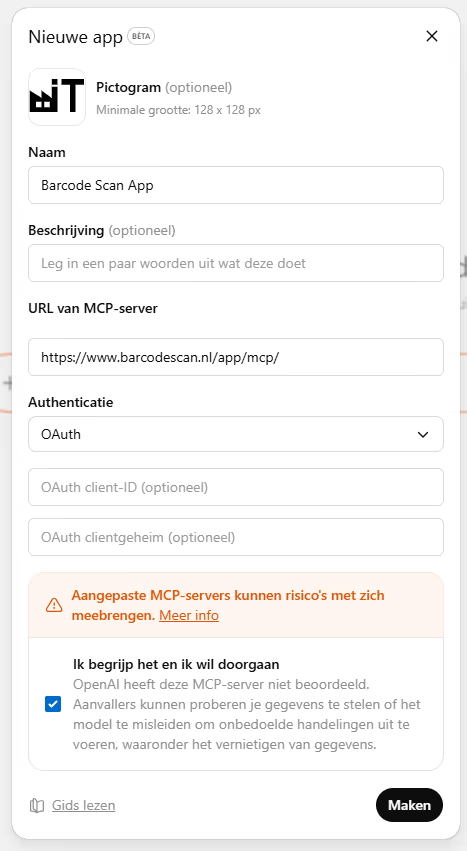
When you connect for the first time, your AI client opens a login screen for the Barcode Scan App. Sign in with your existing account:
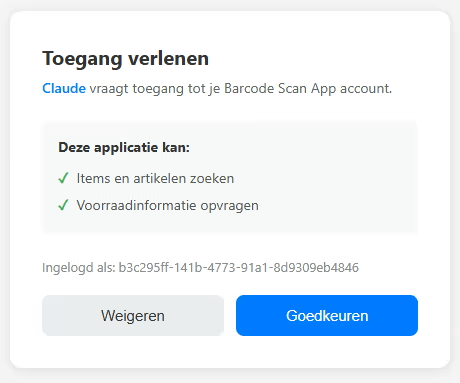
After signing in, a permission screen appears. Click Accept to grant the AI assistant access to your warehouse data:
After authorization, your AI client remembers your permission. You do not need to log in again as long as the session is active.
Configuration
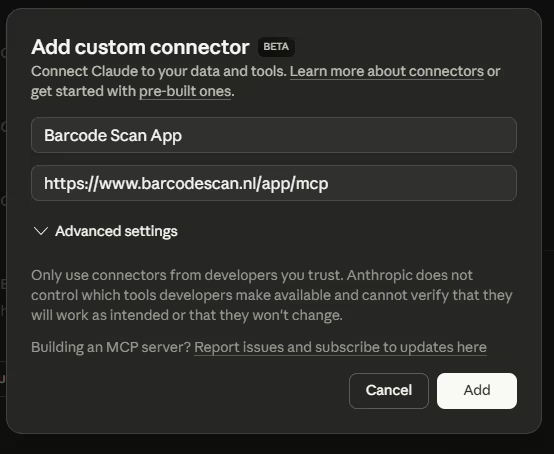
To connect the MCP server to your AI assistant, use the following details:
| Server URL | https://www.barcodescan.nl/app/mcp |
| Transport | Streamable HTTP |
| Authentication | OAuth 2.1 |
| Discovery URL | https://www.barcodescan.nl/.well-known/oauth-protected-resource |
Configuration in Claude Desktop
Add the following to your claude_desktop_config.json:
{
  "mcpServers": {
    "barcodescan": {
      "url": "https://www.barcodescan.nl/app/mcp",
      "transport": "streamable-http"
    }
  }
}
After saving the configuration, the Barcode Scan App appears as an MCP connector in Claude Desktop:
Configuration in Claude Code (CLI)
Run the following command:
claude mcp add barcodescan --transport http https://www.barcodescan.nl/app/mcpConfiguration in ChatGPT
ChatGPT automatically detects the MCP server via the OAuth discovery URL. Add the server URL in the MCP settings of ChatGPT.
Requirements
- An Advanced subscription to the Barcode Scan App (view subscriptions)
- An AI client that supports the MCP protocol (e.g. Claude, ChatGPT, Google Gemini, Microsoft Copilot, Perplexity, Cursor)
- An active Exact Online connection in the Barcode Scan App
Security
The MCP server is designed with security as a priority:
- OAuth 2.1 with PKCE – the most modern authentication standard, protects against token interception
- Limited write access – the AI can create new accounts, sales orders, purchase orders and shop orders, report shop order receipts, issue materials and finish assembly orders; existing data cannot be modified or deleted
- Token expiry – access tokens expire after 1 hour and must be refreshed
- HTTPS – all communication is encrypted
- User-bound – the AI only sees the data of the logged-in user and division
- Permission required – you must explicitly grant permission before an AI assistant gains access
Frequently asked questions
Which subscription do I need?
MCP functionality is available for users with an Advanced subscription.
Which AI assistants support MCP?
MCP is supported by Claude (Anthropic), ChatGPT (OpenAI), Google Gemini (Google), Microsoft Copilot, Perplexity, GitHub Copilot, Cursor and other AI tools that implement the MCP protocol, among others. The number of supported AI clients is growing rapidly.
Can the AI modify my data?
The AI can create new accounts (customers and suppliers), contacts, sales orders, purchase orders, shop orders and sales returns via MCP. Additionally, the AI can report shop order receipts, issue and reverse materials, finish assembly orders, receive by-products and register time transactions. Existing data cannot be modified or deleted.
How do I revoke access?
You can revoke MCP access by removing the OAuth authorization in your AI client settings, or by contacting us.
Does MCP usage count towards the Exact Online API limits?
The MCP server can make API calls to Exact Online, for example when creating orders. These count towards your API limits. For retrieving data, the local cache of the Barcode Scan App is used as much as possible.