The users used in the Barcode Scan App need sufficient permissions in Exact Online to view and edit data there. If insufficient permissions have been assigned, the Barcode Scan App will not function properly.
In Exact Online, go to “Maintenance” in the main menu:

Then click on Users under Monitor:

Make sure that the user you use in the Barcode Scan App also has permissions on the administration being used. If not, move the user to the right column so they have permissions on the administration.
Then click on the user to view that user’s permissions.
Click on Permissions under Monitor:

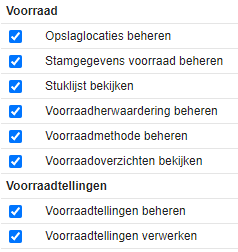
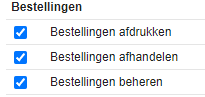
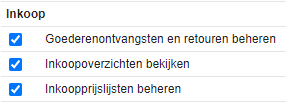
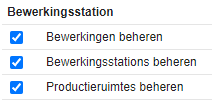
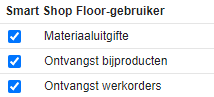
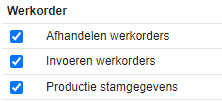
Here the permissions a user has are listed per category. To make the Barcode Scan App work properly, a user needs the following permissions:
General
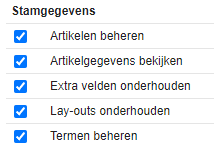
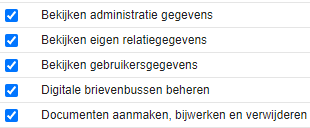
Financial

Sales
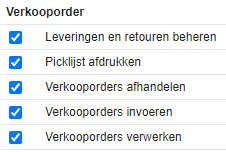
Inventory
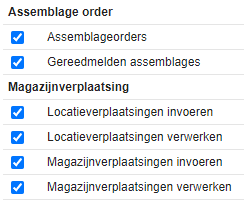
Production
Check communication with the Exact Online API
Go to the settings and press the link “Insight into communication with the Exact Online API”:

There you can see if there are error messages in the communication with Exact Online. This way you can also verify whether the permissions of the app users have been assigned correctly.

You can also check there whether the app usage is hitting the Exact Online API limits.
Message: Forbidden – User division is not within division scope
You may see the message Forbidden – User division is not within division scope in the API insights. This means that the Barcode Scan App does not have sufficient permissions to view this administration. To give the Barcode Scan App access to this administration, follow these steps.
In Exact Online, go to your login name > my exact online > security centre > Permissions for my apps:


Then click on “Allow: All current and future administrations”

Then click Yes to give the Barcode Scan App access to your administrations:

It is also possible to selectively grant access to certain administrations by clicking on Manage administrations:

Then you can indicate per administration what the Barcode Scan App has access to:
